
Best Project Management Tools for 11-50 Person Companies
When your business was just you, yourself, and maybe a handful of others, you had zero intention of running a chaotic operation. It just kinda happened. You were focused on growth and solving the most immediate problem blocking growth.
The company grew and operational chaos began to pile up very quietly in the background. And now that operational chaos is bubbling up right and left.
When you’re in the stage of 11-50 employees, you carry some of the most operational risk you ever will. You’re too big at this point to just rely on knowledge that lives in the CEOs head but you’re too small to have an entire operations team and all the fancy enterprise level systems.
And you know what’s ironic? This is when a project management tool can alleviate a lot of pain for teams this size, but it’s also when companies resist project management the hardest.
Has your team outgrown the current way of working?
Here are some warning signs we see in 11-50 person companies that signal they need to make some operational adjustments:
The question of, “well who owns that?” when referring to tasks or projects starts coming up a lot
When you do your weekly check-in’s, they tend to lean reactive rather than productive
Timelines aren’t written down, and everyone has a different idea of the due date for important deliverables
New hires take a long time to gain true understanding of their roles and every new hire is trained differently, resulting in a lot of nuance to the way your teams work
Tracking projects is happening in your chat tool or email threads
Duplicate work and errors are becoming more frequent
You’re having the same “difficult conversations” continuously
What is poor project management costing you?
Think of operational weakness like interest. It compounds, and it compounds rapidly.
Research consistently shows that poor project management contributes to project failure, wasted budget, and employee burnout. But more importantly than this, is the cultural cost. Your best people will leave when they get sick and tired of the madness. It leads to under appreciation, burnout, and they realize they don’t have to put up with it, especially if leadership doesn’t care enough to address it.
At 11-50 employees, you have a wonderful chance to stop this train on the tracks before it multiplies to an uncontrollable place. When you hit 200 employees, fixing project management is a six month to year long initiative. At 11-50, it should only take a few months to get you back on track.
What do 11-50 person teams need from a project management tool?
Not every project management tool on the market is going to work for your team. Some tools will be so overbuilt for a team of your size that it’s overwhelming. Some are too lightweight, and are geared towards 1-10 person teams. We need to help you find the perfect tool.
Here’s what to look for:
Visibility: everyone should be able to see work at a glance.
Structured ownership: tool forces accountability for every single task.
Flexibility: the tool needs to account for the ways all your different teams work. Creative might think in terms of a Kanban board, your founder might want a list view that works on their phone, your engineering team might want a scrum board.
Adoption friendly: if your team doesn’t accept & adopt the tool, it’s a waste of time and money. This is why we don’t want it to be too complicated or not address what will actually help your team.
Pricing: Per-seat pricing with an 11-50 person team can get hairy. We either need a cost controlled tool, or one where the added seats come at reasonable costs.
The Best Project Management Tools for 11-50 Person Teams
We’ve compiled a list of eight project management tools we’ve seen work for teams of this size. Let’s dive in (scroll down for a visual table breakdown if you’re not in the mood to read the details).
Asana
Best for: Teams who need to get a tool up & running like, tomorrow.
Easy adoption
Intuitive UI
Basic task management fundamentals are there: subtasks, dependencies, milestones, ability to view the work in different ways
Limitations: Resource management
Capacity views are limited on lower tiers and requires front heavy configuration
The document repository feature isn’t great, so you’ll need to find somewhere else to store SOPs. This isn’t great for trimming down your tech stack.
Bottom Line: If your team is non-technical and speed to adoption is the top priority and reporting is not a priority, this might be a good choice for you.
Monday.com
Best for: Teams that need to manage resources and capacity alongside projects.
Sophisticated UI
Resource management capabilities are the best out of this list
All of your basic PM functionalities are in place and intuitive to use and find
Have a specific .dev version for engineering teams
Limitations:
Price per seat is the highest of this entire list
Best features are gated behind higher tiers
Bottom Line: If insight into resourcing is one of your biggest problems and you have the budget, Monday.com is an excellent tool.
ClickUp
Best for: Teams that need a lot of flexibility between multiple teams and are up for a learning curve.
It has every feature you could ever wish for
You can pretty much create any view you could ever dream of
Pricing is reasonable, however, a lot of fancy features are gated behind add-on pricing
Limitations
It has every feature you could ever wish for (yes, this lives in the strengths and weaknesses column)
Requires intentional configuration and ongoing governance - which isn’t a bad idea ever, for the record
You’ll likely need a pro to guide your implementation
Bottom line: If you have an Operations Manager or someone who is able to help lead the rollout and maintain the system, ClickUp might be the tool for you.
Notion
Best for: teams that heavily rely on documented processes and need those processes to be in the same place as their project tracking.
Highly customizable
Aesthetically pleasing
Allows documentation, SOPs, meeting notes, and project management to live in the same ecosystem
Limitations:
This wasn’t intended to be a PM tool, but has somewhat become one? Because of that, it’s a step behind all the other tools with basic project management capabilities
Dependency tracking, Gantt views, and workload management are not simple to set up or siply don’t exist at all
Bottom Line: If documentation and projects have equal importance, Notion may be the tool for you. However, you will likely outgrow Notion.
Jira
Best for: Engineering or product teams running agile development workflows.
The industry standard for software dev teams
Allows sprint planning, backlog management, and issue tracking
Limitations
Often creates more confusion than relief for non-technical teams
Bottom Line: The right choice for engineering-led teams. A difficult sell if you need cross-functional adoption.
Basecamp
Best for: Teams where communication and alignment are the primary pain points.
Clean, clear UI/UX and task management
Great for asynchronous updates
Limitations:
No Gantt views
No resource or workload management
Visual project planning is non-existent
Bottom line: If your team is communication-first and async alignment is the top priority, and resource management is not a core need, Basecamp may be a good option.
Linear
Best for: Product and engineering teams that prioritize speed and clean UX.
Clean UI/UX interface
Keyboard shortcuts are an engineering teams dream
Cycle and project management features
Created specifically for engineering and product teams
Limitations
Not great for cross-departmental project management
Bottom line: Best-in-class for product/engineering teams. Too narrow for cross-functional use.
Teamwork
Best for: Client-facing teams, agencies, and service businesses.
Task management and PM capabilities are equivalent of Asana and Monday.com
Specifically built for agencies as the client collaboration and resource management features are phenomenal
Guest access model allowing clients and external stakeholders to be looped in without extensive permissions configuration
Limitations:
Teamwork runs a slightly higher cost than some of the other tools on this list
The amount of features can introduce a steep learning curve
Bottom line: If you’re a client service org, this is a real contender for you.
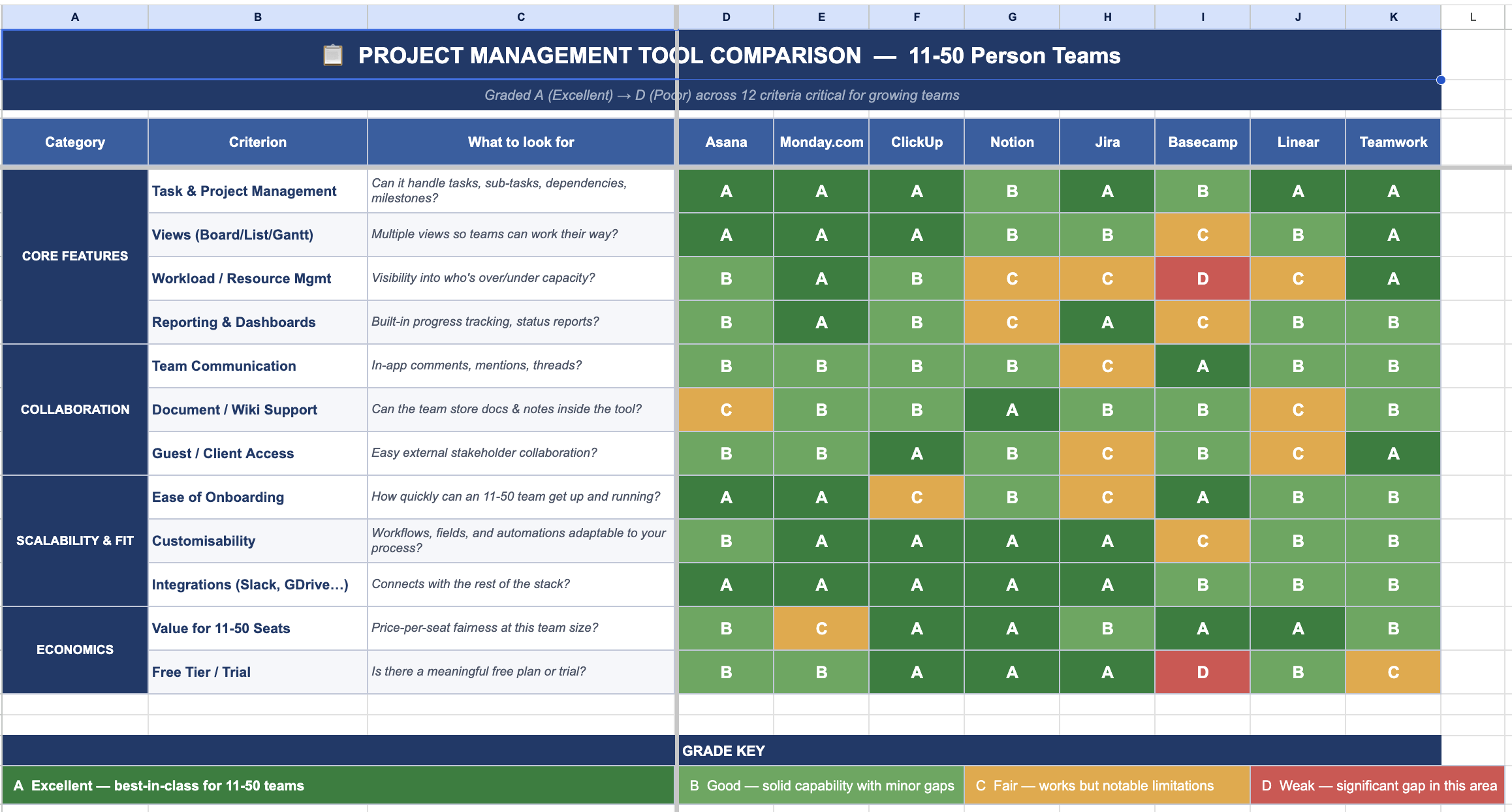
Now that you’re overwhelmed, which one should you actually pick?
Choose ClickUp if
You want the most powerful, flexible platform available
You want a tool you can grow into, you don’t want to redo this selection process in three years
Budget is a constraint but you’re willing to invest in a professional to help implement
You have a team member whose role can maintain this moving forward
Choose Monday.com if
Workload and resource visibility is your biggest issue currently
Leadership needs clean, polished reporting without building it themselves
You have the budget for a premium tool and want a polished out-of-the-box experience
Choose Asana if
Fast adoption across a non-technical team is your top priority
Your project complexity is moderate and doesn't require heavy customization
You've tried other tools before and adoption was always an issue
Choose Teamwork if
You run an agency or any type of client facing company
You will consistently need external collaborators to be able to see how things are moving internally
You need time tracking and resource management integrated
Choose Notion if
Your team's biggest pain is a disconnected knowledge base and scattered documentation
Project complexity is moderate and knowledge management is an equal or bigger priority
You want one tool for docs, wikis, and project tracking rather than three
The cost of dragging your feet on project management tool selection
When we talk to teams, it’s usually the teams who need a PM tool the most that resist it the most. The reasoning? “We’re way too busy to take on a tool rollout right now” or “We’ve tried this in the past and wasted time and money”.
What we want to help people realize is that the reason you feel busy and stretched thin is because you don’t have a system. Now is the time do it, before your team expands even more. At this point, the daily habits of your team are still malleable, and you can design systems that will scale with you instead of putting a ceiling on your growth. The systems that position you as organized, fast, and capable to clients, investors, and future employees.
Pick your tool. Run your rollout. And if you need help thinking through the right fit for your team's specific situation, give us a call.
